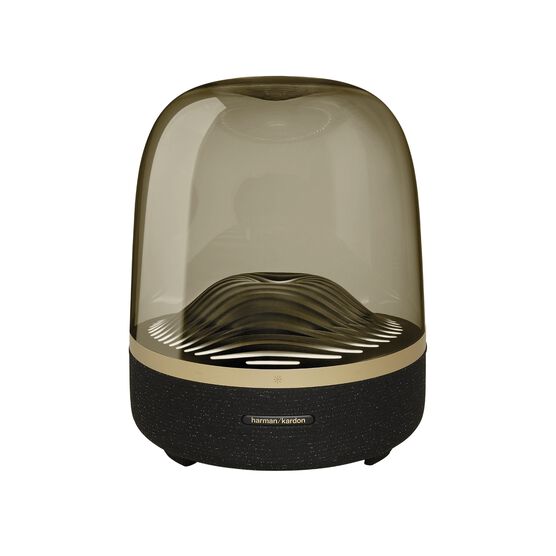


Harman Kardon Aura Studio 3 Black & Gold
Details https://mm.harmankardon.com/AURA+STUDIO+3+BLACK-AND-GOLD-.html?dwvar_AURA%20STUDIO%203%20BLACK-AND-GOLD-_color=Black%20%2F%20Gold-US-CurrentBluetooth speaker
Bluetooth speaker


Distinctive, elegant design
The art of beautiful sound. With a domed design, premium materials, and ambient light effects, the iconic Harman Kardon Aura Studio 3 makes a modern statement in your home.

Exceptional 360-degree sound
Style and substance. Harman Kardon Aura Studio 3 speakers emit exceptional 360 degree audio. Enjoy more dynamic sound thanks to a powerful subwoofer for a truly immersive listening experience.
Ambient light
Let the elegant ripple effect lighting imbue your room with a tranquil ambience. Make every listen a stunning experience for your ears and your eyes.

Wireless streaming with Bluetooth
Stream music wirelessly via Bluetooth to enjoy room-filling sound.
Iconic anywhere
Place the Harman Kardon Aura Studio 3 anywhere in your home. Its elegant shape and minimal footprint fits right in, creating a stunning feature that blends in beautifully with your décor.
Elevate your home with the timeless, iconic design of the Harman Kardon Aura Studio 3 for 360 degrees of beautiful sound. A stunning Bluetooth speaker that looks as good as it sounds. It pairs room-filling audio with integrated ambient light effects, a water wave ripple movement to experience your music in a new, visually dynamic way. With a domed design as understated as its small footprint, this piece blends in beautifully with your décor, in any room of your home.
General Specifications
Spec Sheet (English)
English 487 KB- 1 x Harman Kardon Aura Studio 3
- 1 x Power cable
- 1 x Quick-Start Guide
- 1 x Safety sheet
- 1 x Warranty card

The latest owner's manuals, quick start guides, and documents.
Aura Studio Series
\nNote: This action will erase all settings and Bluetooth data from the device. You will be required to pair and connect to your devices again after this action is done.
\n\n
Aura Studio, Aura Studio 2
\n- Turn the speaker ON
- Press and hold the Volume (+) & Phone button for more than 5 seconds
- All LED indicators will flash and the speaker will power off and be factory reset
\n
Aura Studio 3
\n- Turn the speaker ON
- Press and hold the Light Effect button for more than 10 seconds
- The speaker will power off and be factory reset
\n
Aura Studio 4
\n- Turn the speaker ON
- Press and hold the Volume (+) & Bluetooth button for more than 5 seconds
- The speaker will power off and be factory reset
\n
Aura Studio 5, Aura Studio 5 Wi-Fi
\n- Turn the speaker ON
- Press and hold the Light Mode, Vol +, & Vol - button for more than 7 seconds
- The speaker will power off and be factory reset
Or alternatively;
\n\n
- Open your Harman Kardon One App.
- Navigate to the support tile.
- Select RESTORE FACTORY SETTINGS.
Aura Studio Series
\nNote: This action will erase all settings and Bluetooth data from the device. You will be required to pair and connect to your devices again after this action is done.
\n\n
Aura Studio, Aura Studio 2
\n- Turn the speaker ON
- Press and hold the Volume (+) & Phone button for more than 5 seconds
- All LED indicators will flash and the speaker will power off and be factory reset
\n
Aura Studio 3
\n- Turn the speaker ON
- Press and hold the Light Effect button for more than 10 seconds
- The speaker will power off and be factory reset
\n
Aura Studio 4
\n- Turn the speaker ON
- Press and hold the Volume (+) & Bluetooth button for more than 5 seconds
- The speaker will power off and be factory reset
\n
Aura Studio 5, Aura Studio 5 Wi-Fi
\n- Turn the speaker ON
- Press and hold the Light Mode, Vol +, & Vol - button for more than 7 seconds
- The speaker will power off and be factory reset
Or alternatively;
\n\n
- Open your Harman Kardon One App.
- Navigate to the support tile.
- Select RESTORE FACTORY SETTINGS.


